Baby Shower Planner
The Ultimate Free Baby Shower Planner: Organize Your Event with Ease
Planning a baby shower is a joyful experience, but it can quickly become overwhelming. Between managing the guest list, coordinating food, keeping track of gifts, and staying within your budget, it helps to have everything organized in one place.
The biggest challenge is often keeping track of all the details. That is why this Free Baby Shower Planner brings your event information, guest list, checklist, shopping items, budget, and timeline together in one easy-to-use digital workspace.
Why Use This Baby Shower Planner?
Unlike printable templates that can get misplaced, this online planner lets you update your plans whenever you need to. You can use it on a desktop computer, tablet, or mobile device, making it easier to keep track of your preparations while shopping or coordinating with co-hosts.
Your privacy matters: Your planning information is stored locally in your browser. You do not need to create an account, and your planning data is not sent to our servers by the planner. You can return to your saved information using the same browser and device, provided the browser data has not been cleared. For extra protection, export a backup of your planner data regularly.
A Step-by-Step Guide to Planning Your Baby Shower
1. Set the Date, Venue, and Timeline
Start with the Events section. Enter the shower date, time, and venue. The countdown helps you see how much time remains before the event.
Planning tip: Give yourself enough time to arrange the main details, such as the venue, guest list, invitations, food, and decorations. Starting several weeks ahead can make the process easier, although the time you need will depend on the size of the shower and the arrangements involved.
Use the Timeline section to organize tasks by week or date. You can customize the labels and task descriptions to fit your schedule instead of leaving everything until the last minute.
2. Manage Guests and Invitations
The Guests section helps you build and maintain your guest list. Keeping track of responses can make it easier to plan seating, refreshments, and party supplies.
RSVP tracking: Assign each guest a status, such as confirmed, pending, or declined. Use the running total to help estimate attendance.
Invitation management: Track who has received an invitation and who still needs one.
Guest notes: Record useful planning details, such as dietary preferences or food allergies, when guests choose to share them. If you are serving food, confirm any relevant requirements with the guest and communicate them clearly to the person preparing or providing the food.
Keep personal guest information private, especially when sharing your planner or exported files with other people.
3. Use the Baby Shower Checklist to Plan Activities
The Checklist section helps you organize the tasks that will make your event special. Add items, mark completed tasks, and remove anything that no longer fits your plans.
Looking for activity ideas? Consider these options:
The Price Is Right: Let guests guess the prices of selected baby items.
Blind Diaper Changing: Invite guests to practice changing a doll while wearing a blindfold, if they are comfortable participating.
Onesie Decorating: Set up a decorating station with suitable fabric markers and plain onesies.
Choose activities that fit your guests, available space, and party theme. You can also skip games entirely and focus on conversation, food, and time together.
4. Organize Decorations, Shopping, and Your Budget
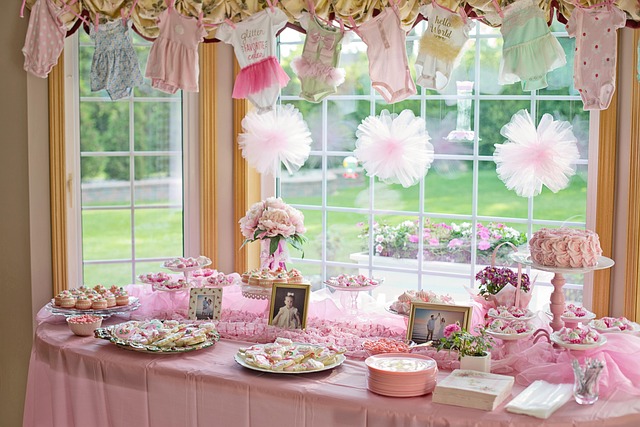
The Decorations section helps you collect ideas and track purchases. Whether you prefer a woodland theme, a starry-night design, or a simple color scheme, keeping your ideas and shopping lists together can help you avoid unnecessary duplicate purchases.
Plan a budget that works for your event
The Budget section lets you enter your estimated budget and record actual expenses. The planner calculates your remaining balance based on the figures you enter.
There is no single budget split that works for every baby shower. Your spending will depend on the number of guests, venue, food choices, decorations, activities, and what you already have available.
If you need a starting point, consider listing these expenses:
Food and beverages
Venue or space rental, if applicable
Decorations and table supplies
Games, activities, and prizes
Invitations and other supplies
Gifts or favors, if you plan to provide them
Extra funds for unexpected expenses
Adjust the amounts to match your priorities rather than following fixed percentages. A gathering at home may require little or no venue spending, while a larger event may need more money for food and space.
Use the Shopping section to track supplies and mark items as purchased. If you have co-hosts, divide the shopping responsibilities so everyone knows what they are handling.
5. Track Gifts, Thank-You Notes, and Other Details
The Gifts section helps you record gifts and the names of the people who gave them. You can also track thank-you notes as you prepare and send them.
Recording gifts during or shortly after the event can make it easier to remember the details later.
Use the Notes section to save ideas, reminders, questions, and other information that does not fit into the planner's main sections.
Save, Export, and Share Your Plans
Your plans may change as the event approaches. Use the planner's available export options to save your information as a CSV or JSON file. These files can help you keep a backup or move your information between devices.
You can also print your plans for a paper binder. If you share an exported file with co-hosts, check it first to make sure it does not contain personal information you would prefer to keep private.
Keep a backup in a safe location, particularly if you plan to clear your browser data or change devices.
Final Thoughts: Make the Planner Work for You
There is no single correct way to organize a baby shower. You do not need to complete every section at once. Start with the details that matter most to your event, then add information as your plans develop.
Review your guest responses, checklist, shopping items, budget, and timeline as the date approaches. Keeping these details organized can make the planning process easier and leave you with more time to enjoy the celebration.
Explore Baby Names
Planning a baby shower can also be a great time to explore ideas for the baby's name. If you are looking for inspiration, browse different baby names for boys and girls, including unique names, classic choices, and names with special meanings. Visit The Bump's Baby Names Guide to explore different options while you organize your celebration with our free Baby Shower Planner.